
Free and open source, by The Windstorm on GitHub (github.com/TheWindstorm). Get it at github.com/TheWindstorm/windstorm-pit-stop. More from The Windstorm: thewindstorm.ai (the podcast) and grantwhitmer.com (Grant Whitmer, who built it).
Your AI re-reads the whole conversation on every reply
Every time Claude answers, it reads everything said so far in that session. A long session is a backpack that keeps getting heavier, and you pay to carry it on every single step. Pit Stop empties the backpack at the right moments: at a break between tasks, not in the middle of one, whenever it can.
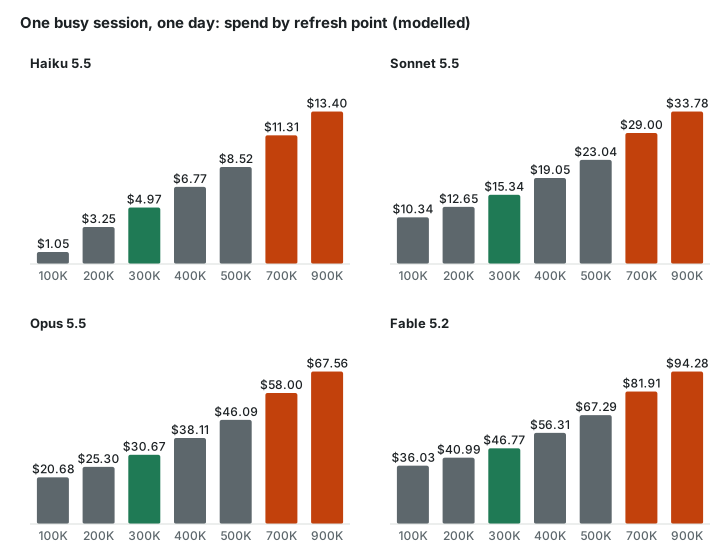
saved per busy session per month on Claude Opus 5.5, by refreshing at 300K instead of letting the session run to 700K. Modelled from 22,750 real replies.
What Pit Stop does for you
- Long sessions get expensive. Claude re-reads your whole conversation on every reply. Pit Stop refreshes the session at a break between tasks, so you stop paying to drag a huge history along.
- It doesn't lose the thread. It refreshes between tasks, not in the middle of one, whenever it can.
- It learns each project. It fits the refresh point of each of your projects to that project's own history.
- It keeps you current. It tells you when a newer Claude Code is ready. If you run sessions in tmux on Linux or macOS with a paid Claude plan, it can move them onto it at a break, same conversation.
- Small overhead. It is plain code on your computer and never calls an AI to decide anything. On the machine we measured it cost about 2% of the day's usage.
It works with Claude Code only, for now.
What changed on our machine
We run Pit Stop on our main machine, where Claude Code sessions work around the clock on many projects (94 today), using between 1.9 and 9.9 billion tokens a day (November 4-12, 2026). For each session we compared its history before Pit Stop's hooks were loaded (from October 26, 2026) with the time after. This is our own machine and our own work, not a controlled trial.
- Automatic refreshes in the middle of a task: 52% before Pit Stop (280 of 543), 11% with it (32 of 291). Sessions that ran without it over the same days: 76% (134 of 177).
- After a refresh, sessions re-read files they had just lost less often: 17% of their first file reads before Pit Stop, 10% with it (a small sample: 163 reads with Pit Stop).
- Overnight from November 12 to 13, it moved 86 sessions onto a new Claude Code version at their breaks, with nobody watching.
- Not measured yet: what it saves in practice. The savings above are modelled; they depend on each project's refresh point, which we started tuning for a test group on November 13. The comparison with untouched sessions comes next. Pit Stop's own cost was about 2% on the day we measured.
A heavier session costs more per reply
The price of one reply grows in a straight line with the size of the conversation. Re-read tokens are cheap each, but there are a lot of them, hundreds of times a day.
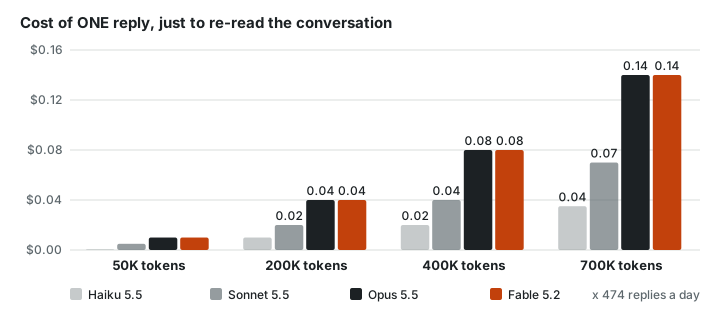
Price of re-reading the conversation once (cached input) at Anthropic's list API prices as published on November 3, 2026. Output and new text come on top.
You pay for the shaded area
A session grows as it works. A refresh (Claude Code calls it compaction) swaps the long history for a short summary and the session keeps going. The shaded area is everything you pay to re-read. Refresh at a lower point and the area shrinks.
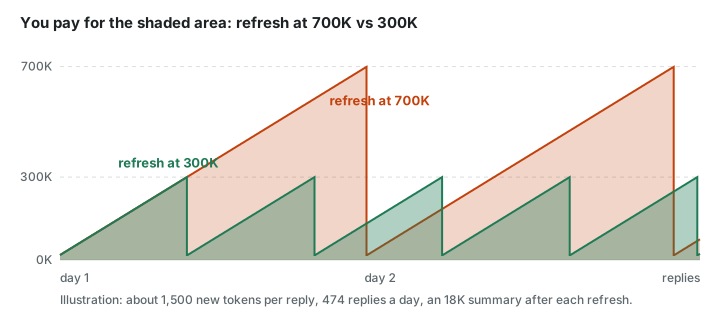
Illustration: a busy session adding about 1,500 tokens per reply, 474 replies a day (the averages we measured), refreshing to an 18K summary.
What it costs, by refresh point and model
Less baggage, cleaner breaks
Old topics get in the way
When you switch from the login page to the invoice bug, everything about the login page is still in the backpack. The model has to work around it on every reply. A refresh between tasks leaves a short summary and a clear head.
Bad timing loses the thread
Without Pit Stop, Claude Code refreshes the moment a size is reached, even in the middle of a task. The summary then cuts a task in half. Pit Stop waits for the break. On our machine it moved 34 refreshes off the middle of work in one day.
Pit Stop cost about 2% on the day we measured
Waiting for a break means a session sometimes works a few extra minutes at a larger size, and a restart onto a new Claude Code rebuilds its cache once. We measured both on 48 busy sessions over a day.

Everything Pit Stop decides is plain code on your computer. It never calls an AI model to decide anything.
Too low and it forgets
After a refresh, a session sometimes has to open files again that it just forgot. Refresh too often and that re-reading, and the mistakes from lost detail, eat the savings. The right point is different for every project. Pit Stop's tuner reads each project's own history every day, counts how often it had to re-read after a refresh, and moves its refresh point one step at a time: lower while nothing is lost, back up when it is.
How these numbers were made: one day (22,750 replies, 48 busy sessions, one machine) replayed at each refresh point and priced at Anthropic's list API prices as published on November 3, 2026. The cost of re-reading forgotten files is not in the model, so treat the low end as optimistic. On a Claude subscription you are not billed per token, but the same tokens count against your usage limits. Pit Stop is an independent plugin. It is not made or endorsed by Anthropic. Claude, Claude Code and the model names are Anthropic's.
Install in one minute
Pit Stop lives on GitHub in The Windstorm's organization, github.com/TheWindstorm. Its own page, with the source code and these same steps, is github.com/TheWindstorm/windstorm-pit-stop. You don't have to download anything from there yourself: step 1 below points Claude Code at it.
Easiest: let Claude do it. Open Claude Code and paste this to it:
Install the Claude Code plugin from https://github.com/TheWindstorm/windstorm-pit-stop using the terminal commands in the Install section of its README, then tell me what to type next.Claude can run the install commands for you. Then type /reload-plugins and /pit-stop setup (step 3 below).
Or do it yourself. You type three short commands, one at a time, into Claude Code itself (the box where you talk to Claude), not into a separate terminal window. Pasted together they arrive as one message and do not run as three commands.
Open Claude Code. Copy this line, paste it into Claude Code and press Enter. It tells Claude Code where to find Pit Stop.
/plugin marketplace add TheWindstorm/windstorm-pit-stopWhen that has finished, copy this line, paste it and press Enter. It installs Pit Stop. If Claude Code asks you to confirm, say yes.
/plugin install windstorm-pit-stop@thewindstormCopy this line, paste it and press Enter. It shows you a plan first and changes nothing until you say yes.
/pit-stop setup
If Claude Code says it does not know /pit-stop, type /reload-plugins and press Enter (or close and reopen Claude Code), then do step 3 again. After that it runs by itself: refreshes at breaks, tunes each project's refresh point, and moves sessions onto new Claude Code versions at a break.